.png)
Native design
Accounts
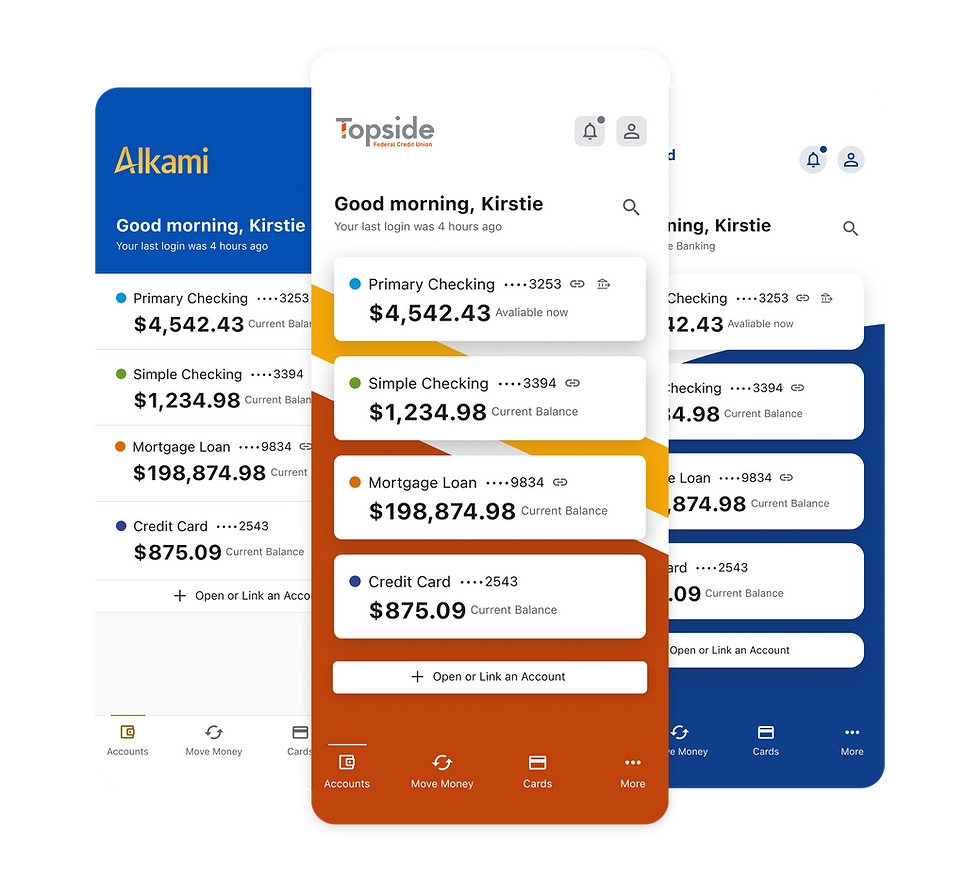
The mobile accounts page serves as the central hub for users to view and manage their financial accounts with ease. Designed for clarity and efficiency, it provides a high-level snapshot of balances, along with interactive cards that guide users into deeper experiences like the account details page or the personalized dashboard.
Impact
The mobile accounts page improves user engagement and satisfaction by providing a clear, centralized view of account information and seamless navigation to related features. By streamlining access to key actions—like viewing details, managing transactions, or jumping to the dashboard—it reduces friction, increases time spent in-app, and encourages deeper interaction with financial tools.
This intuitive, mobile-optimized experience drives higher digital adoption, reduces call center inquiries, and supports cross-sell opportunities by making account features more visible and accessible—all while reinforcing trust through real-time transparency and ease of use.
.png)
Theme Builder Configurations
Theme Builder empowers financial institutions to personalize key areas of the mobile banking experience—specifically the Accounts Dashboard and Account Details Page—without any development effort. These configuration options allow clients to visually align their platform with their brand while maintaining a consistent and user-friendly interface.
Accounts Dashboard Configuration
-
Layout Style: Choose between a list or card layout to display account summaries in a way that best fits the brand and user needs.
-
Background Options: Apply a custom background image or a solid background color to visually enhance the page.
-
Header Styling: Select a header color that complements the institution’s brand palette and maintains visual hierarchy.
Account Details Page Configuration
-
For a more tailored account view, clients can configure the background color of the Account Details Page to match their primary or secondary brand colors, creating a cohesive transition from dashboard to detail.
Card or List Layout
The mobile accounts experience supports two flexible layout styles, list and card, to meet different branding and UX needs. These layouts can be selected and configured via Theme Builder, giving institutions the ability to align the login experience with their visual identity and user expectations.
List Layout
-
A vertically stacked, full-width layout where login fields, buttons, and links flow from top to bottom. This layout offers a clean, flat structure, ideal for institutions that prefer a more traditional or spacious design approach.
Card Layout
-
A card centered within the screen that houses all login elements. The card layout provides a modern, focused experience - especially useful when paired with branded background imagery or stylized visuals.
.png)

Admin Configurations
Financial institutions can now define up to three customizable actions that appear on each Account Details Page, tailored to the type of account. Through a streamlined admin interface, institutions can select relevant actions—such as Transfer Funds, View Statements, Make a Payment, or Set Up Alerts—based on account attributes like checking, savings, credit card, or loan.
Each action is context-aware, ensuring users only see options that are functional and appropriate for the selected account type. This configuration requires no development work and can be updated at any time, allowing institutions to respond quickly to user needs, seasonal campaigns, or evolving product offerings.
Key Benefits
-
Contextual Relevance: Only actions that apply to the account type are shown, creating a clear and purposeful experience.
-
No-Code Configuration: Admins can define, update, or reorder actions directly within the admin tool.
-
Enhanced Engagement: Promotes deeper interaction with financial tools right where users need them.
-
Scalable Customization: Supports consistent action sets across product lines while allowing for variation when needed.

Personalized Dashboard
The personalized accounts dashboard allows financial institutions to go beyond basic balance views by surfacing dynamic, user-relevant content directly within the accounts experience. Built to support modular flexibility, this dashboard enables institutions to highlight features like credit score tracking, youth or kids account promotions, alerts and notifications, and financial wellness tools—all based on the user’s profile, account type, or engagement level.
By integrating promotional modules and personalized insights into the primary dashboard view, financial institutions can educate, cross-sell, and support users without disrupting their experience. These cards are fully configurable and can be toggled on or off through admin tools, ensuring the dashboard remains clean, relevant, and brand-aligned.
Key Features
-
Promote key offerings like credit score tools, teen accounts, or new savings goals
-
Display timely alerts and personalized messages
-
Modular layout easily adapts to brand or campaign needs
-
Designed for engagement without disrupting core banking tasks


The Outcome & Business Goal
Providing Theme Builder configuration options for the Accounts Dashboard and Account Details Page empowers financial institutions to deliver a fully branded, visually cohesive mobile experience—without relying on development resources. By allowing layout choices, background customization, and header styling, institutions can tailor key user touchpoints to match their identity and user preferences.
This flexibility supports faster client onboarding, reduces the need for custom design and engineering work, and enhances user engagement through familiar, on-brand visuals. The result is a scalable, white-label-ready platform that drives client satisfaction, operational efficiency, and brand consistency across all digital channels.
View Other Projects
Scroll through my projects to find another one to read about that tickles your fancy

.png)
.png)


.png)

What are the perks?

Cross-Platform Efficiency with Flutter
Built in Flutter, the login experience runs seamlessly across iOS and Android with a single codebase—reducing development time and ensuring feature parity.

Enhanced Engagement
By surfacing relevant account information and related tools, the accounts page encourages users to explore more features and spend more time in-app.
.png)
Configurable via Theme Builder
Fully themable through admin and Theme Builder, allowing institutions to customize layouts and background images,—supporting white-label needs without engineering effort.

At-a-Glance
Financial Clarity
Users can quickly view balances across all accounts in one place, helping them stay informed and in control of their finances.